Lab · reference
Lab tasks
You control the virtual lab with mise run lab:<task>.
Each task calls one verb of lab/lab.sh. mise puts the pinned tools on the PATH.
At a glance
Section titled “At a glance”- Form
mise run lab:<task>- Defined in
- mise.toml
- Script
- lab/lab.sh
- Cluster access
.lab/kubeconfigonly. No task reads~/.kube/config.- Unattended tasks
- They approve each operation that the operator proposes. Use them only where that is correct.
All tasks
Section titled “All tasks”| Task | What it does | Changes |
|---|---|---|
doctor |
Checks the workstation. | Nothing |
render |
Renders the lab spec. | .lab/generated/ |
up |
Starts the lab. | Workstation, cluster |
load |
Builds the operator again and restarts the manager. | Cluster |
status |
Shows the rack and all objects. | Nothing |
top |
Shows a live view of each machine. | Only when you press a key |
approve |
Approves each operation that waits. | Machines |
apply |
Applies manifests as a member of the admin group. | Cluster |
kubeconfig |
Writes the access files of the Talos cluster. | .lab/ |
wait |
Approves and waits for all nodes. | Machines |
release |
Deletes one claim and waits for its Host. | Machines |
day2 |
Reboots two nodes and makes a change without a reboot. | Machines |
upgrade |
Upgrades Talos through a rollout. | Machines |
scale |
Adds, removes and replaces nodes. | Machines |
backup-restore |
Loses etcd and restores it. | Machines |
observe |
Checks the status tables, the metrics and a maintenance window. | Cluster |
pivot |
Moves the operator and installs a second cluster. | Machines, cluster |
collect |
Writes diagnostics. | .lab/diagnostics/ |
down |
Stops the lab. | Workstation, cluster |
reset |
Deletes the disks of the machines. | .lab/state/ |
The usual round
Section titled “The usual round”- Start the lab:
mise run lab:up. - Read the proposals:
mise run lab:status. - Approve the installs:
mise run lab:approve. - Look again until all Hosts are Provisioned:
mise run lab:status. - Get the access files:
mise run lab:kubeconfig. - Stop the lab:
mise run lab:down.
Your first cluster in the lab shows this round with the expected output.
Start and stop
Section titled “Start and stop”doctor
Section titled “doctor”Checks the workstation for all that the lab needs. Each item that is missing prints its fix.
- Verb
lab/lab.sh doctor- Reads
PK_LAB_NODES,PK_LAB_WORKLOAD,PK_LAB_SPEC,PK_LAB_MIN_FREE_GIB,PK_LAB_KIND_CONFIG- Changes
- Nothing. The
sudocheck can ask for your password.
The checks are in what the doctor checks.
render
Section titled “render”Renders the lab spec into .lab/generated/. Use it to read the manifests before you start the lab.
- Verb
lab/lab.sh render- Reads
PK_LAB_NODES,PK_LAB_WORKLOAD,PK_LAB_SPEC,PK_LAB_TALOS- Changes
- The files in rendered files only.
Starts the lab. You can run it again: it uses again what exists, and it applies a changed spec.
- Verb
lab/lab.sh up- Runs first
mise run build, which buildsmetal/bin/pk-metal- Parts
doctor,render,network,cluster,deploy,fleet,manifests. See Parts of up.- Uses sudo
- Yes, for the network. See What runs as root.
- Refuses
- A different size while the fleet runs. A start after
pivot, until you rundownandreset.
$ mise run lab:up
ok    go
ok    kind
ok    kubectl
ok    talosctl
ok    yq
ok    jq
ok    curl
ok    docker daemon answers
ok    docker is Docker Engine on this host (not podman, not Docker Desktop)
ok    docker runs as root (rootless Docker is not supported)
ok    /dev/kvm is usable by alice
ok    QEMU (qemu-system-x86_64, /usr/libexec/qemu-kvm or $PK_METAL_QEMU)
ok    OVMF (UEFI firmware for the machines)
ok    https://factory.talos.dev answers (installer images)
ok    the lab spec renders
ok    11264 MiB of available memory for 3 machines
ok    15 GiB free under /home/alice/platform-kit/.lab
the workstation has what the lab needs
== render /home/alice/platform-kit/lab/lab.yaml into /home/alice/platform-kit/.lab/generated
== lab network
  bridge pkbr0
  tap pktap1 (owner alice)
  tap pktap2 (owner alice)
  tap pktap3 (owner alice)
  enable IPv4 forwarding
  firewall rules (forwarding in DOCKER-USER)
== kind cluster pk-metal
Creating cluster "pk-metal" ...
== operator image
== operator deployment (pk-metal:4f2a9c1)
deployment "pk-metal-manager" successfully rolled out
== simulated fleet
  started (pid 48213, log /home/alice/platform-kit/.lab/fleet.log)
  BMC https://10.77.0.1:8441 answers
  BMC https://10.77.0.1:8442 answers
  BMC https://10.77.0.1:8443 answers
== lab manifests
asset.metal.platform-kit.org/node-1 serverside-applied
...
hostclaim.metal.platform-kit.org/node-3 serverside-applied

The lab is up. The operator now enrolls the machines and proposes to boot them.
  watch it:      mise run lab:status
  let it happen: mise run lab:approve     (the one human step)
  afterwards:    mise run lab:kubeconfig
After up, the operator proposes one install for each machine. The installs wait for approve.
The operator downloads each installer image from the Talos image factory before it proposes the install.
Thus the first approval in top or with pk-metal approve mounts an image that is ready.
Builds the operator image from the working tree, loads it into kind and applies the deployment. Use it after you change the operator code.
- Verb
lab/lab.sh deploy- Needs
- A lab that is up, and no pivot.
- Changes
- The image, the CRDs and the Deployment
pk-metal-manager
Stops the fleet, deletes the kind cluster and the registry container, and removes the lab network.
- Verb
lab/lab.sh down- Keeps
- The disks of the machines, the image cache and the Talos secrets bundle.
- Deletes
- The kubeconfig files and the talosconfig files in
.lab/. It keeps the mark file.lab/pivoted.
The fleet turns the machines off before it stops. After 30 seconds, the script stops the fleet with force.
Deletes the state directory of the fleet: the disks and the firmware variables of all machines.
The next up installs each machine again.
- Verb
lab/lab.sh reset- Needs
- A lab that is down.
- Safety
- It deletes the directory only if it is in
.lab/, or if it has the mark file that the lab wrote. - Also deletes
- The mark file
.lab/pivoted, because no disk holds a moved operator after the wipe.
Watch and approve
Section titled “Watch and approve”status
Section titled “status”Shows the output of pk-metal status, then all objects of the operator with kubectl get.
- Verb
lab/lab.sh status- Changes
- Nothing.
The column BLOCKED shows what each Host, operation and endpoint waits for.
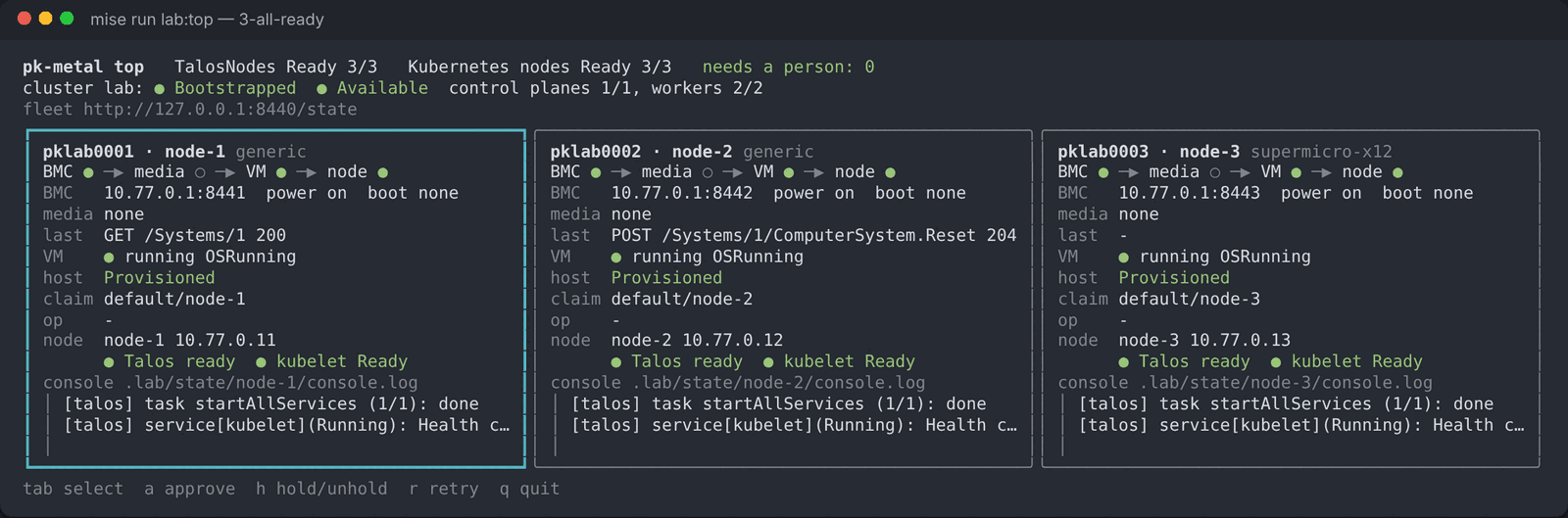
Starts pk-metal top for the lab: one tile for each machine, with its BMC, its virtual machine, its operation and its node.
- Verb
- None. The task starts
metal/bin/pk-metal top --fleet http://127.0.0.1:8440/state. - Runs first
mise run build- Needs
.lab/kubeconfig. With.lab/workload.kubeconfig, it also shows the state of each kubelet.
pk-metal top   TalosNodes Ready 1/3   Kubernetes nodes Ready 1/1   needs a person: 1
cluster lab: ● Bootstrapped  ✗ Available (NodesNotReady)  control planes 1/1, workers 0/2
fleet http://127.0.0.1:8440/state
╭─────────────────────────────────────────────╮╭─────────────────────────────────────────────╮
│ pklab0001 · node-1 generic                  ││ pklab0002 · node-2 generic                  │
│ BMC ● ─▶ media ○ ─▶ VM ● ─▶ node ●          ││ BMC ● ─▶ media ● ─▶ VM ◐ ─▶ node ◐          │
│ BMC   10.77.0.1:8441  power on  boot none   ││ BMC   10.77.0.1:8442  power on  boot Cd/On… │
│ media none                                  ││ media CD: metal-amd64.iso                   │
│ last  GET /Systems/1 200                    ││       USBStick: node-2-config.iso           │
│ VM    ● running OSRunning                   ││ last  POST /Systems/1/…/ComputerSystem.Res… │
│ host  Provisioned                           ││ VM    ◐ running OSBootStarted               │
│ claim default/node-1                        ││ host  Provisioning                          │
│ op    -                                     ││ claim default/node-2                        │
│ node  node-1 10.77.0.11                     ││ op    7/9 awaitCheckIn, approved by alice   │
│       ● Talos ready  ● kubelet Ready        ││       pk-metal/provision-pklab0002-1a2b3c4d │
│ console .lab/state/node-1/console.log       ││ node  node-2 10.77.0.12                     │
│ │ [talos] task startAllServices (1/1): done ││       ◐ Talos MaintenanceMode               │
│ │ [talos] service[kubelet](Running): Healt… ││ console .lab/state/node-2/console.log       │
╰─────────────────────────────────────────────╯│ │ BdsDxe: loading Boot0002 "UEFI QEMU DVD…  │
                                               │ │ [    0.000000] Linux version 6.12.40-tal… │
                                               ╰─────────────────────────────────────────────╯
┏━━━━━━━━━━━━━━━━━━━━━━━━━━━━━━━━━━━━━━━━━━━━━┓
┃ pklab0003 · node-3 supermicro-x12           ┃
┃ BMC ● ─▶ media ○ ─▶ VM ○ ─▶ node ◐          ┃
┃ BMC   10.77.0.1:8443  power off  boot none  ┃
┃ media none                                  ┃
┃ last  GET /Systems/1 200                    ┃
┃ VM    ○ off                                 ┃
┃ host  Assigned · Approval(Provisioning)     ┃
┃ claim default/node-3                        ┃
┃ op    1/9 ejectMedia, waits for approval    ┃
┃       pk-metal/provision-pklab0003-bf98c842 ┃
┃ node  node-3 10.77.0.13                     ┃
┃       ◐ Talos AwaitingContact               ┃
┃ console .lab/state/node-3/console.log       ┃
┃ │                                           ┃
┃ │                                           ┃
┗━━━━━━━━━━━━━━━━━━━━━━━━━━━━━━━━━━━━━━━━━━━━━┛
tab select  a approve  h hold/unhold  r retry  q quit
pk-metal top   TalosNodes Ready 1/3   Kubernetes nodes Ready 1/1   needs a person: 1
cluster lab: ● Bootstrapped  ✗ Available (NodesNotReady)  control planes 1/1, workers 0/2
fleet http://127.0.0.1:8440/state
┌────────────────────────────────────────────────────────────────────────────────────────────┐
│ operation pk-metal/provision-pklab0003-bf98c842                                            │
│   why:         Provisioning                                                                │
│   proposed by: system:serviceaccount:pk-metal:pk-metal-manager                             │
│ host pklab0003 (asset node-3, serial PKLAB0003)                                            │
│   BMC: https://10.77.0.1:8443 (endpoint node-3)                                            │
│ steps, in this order:                                                                      │
│    1. eject whatever is mounted on virtual media slot VirtualMedia1                        │
│    2. eject whatever is mounted on virtual media slot VirtualMedia2                        │
│    3. mount the Talos v1.14.6 installer on virtual media slot VirtualMedia1                │
│    4. mount the machine config of TalosNode node-3 on virtual media slot VirtualMedia2     │
│    5. boot from UsbCd at the next start only, in UEFI mode                                 │
│    6. power cycle: if the machine is on, force it off (no clean shutdown) and on again;    │
│       if it is off, power it on                                                            │
│    7. wait up to 30m for TalosNode node-3 to report in at 10.77.0.13                       │
│    8. eject whatever is mounted on virtual media slot VirtualMedia2                        │
│    9. eject whatever is mounted on virtual media slot VirtualMedia1                        │
│ boots TalosNode node-3: address 10.77.0.13, role worker                                    │
│   installs Talos onto the disk that matches serial=pklab-disk-3                            │
│   everything on that disk is overwritten                                                   │
│                                                                                            │
│ Approve as carol? [y/N]                                                                    │
└────────────────────────────────────────────────────────────────────────────────────────────┘
y approve  any other key: do not approve
pk-metal top   TalosNodes Ready 2/3   Kubernetes nodes Ready 2/2   needs a person: 0
cluster lab: ● Bootstrapped  ✗ Available (NodesNotReady)  control planes 1/1, workers 1/2
fleet http://127.0.0.1:8440/state
╭─────────────────────────────────────────────╮╭─────────────────────────────────────────────╮
│ pklab0001 · node-1 generic                  ││ pklab0002 · node-2 generic                  │
│ BMC ● ─▶ media ○ ─▶ VM ● ─▶ node ●          ││ BMC ● ─▶ media ○ ─▶ VM ● ─▶ node ●          │
│ BMC   10.77.0.1:8441  power on  boot none   ││ BMC   10.77.0.1:8442  power on  boot none   │
│ media none                                  ││ media none                                  │
│ last  GET /Systems/1 200                    ││ last  POST /Systems/1/…/ComputerSystem.Res… │
│ VM    ● running OSRunning                   ││ VM    ● running OSRunning                   │
│ host  Provisioned                           ││ host  Provisioned                           │
│ claim default/node-1                        ││ claim default/node-2                        │
│ op    -                                     ││ op    -                                     │
│ node  node-1 10.77.0.11                     ││ node  node-2 10.77.0.12                     │
│       ● Talos ready  ● kubelet Ready        ││       ● Talos ready  ● kubelet Ready        │
│ console .lab/state/node-1/console.log       ││ console .lab/state/node-2/console.log       │
│ │ [talos] task startAllServices (1/1): done ││ │ [talos] task startAllServices (1/1): done │
│ │ [talos] service[kubelet](Running): Healt… ││ │ [talos] service[kubelet](Running): Healt… │
╰─────────────────────────────────────────────╯╰─────────────────────────────────────────────╯
┏━━━━━━━━━━━━━━━━━━━━━━━━━━━━━━━━━━━━━━━━━━━━━┓
┃ pklab0003 · node-3 supermicro-x12           ┃
┃ BMC ● ─▶ media ● ─▶ VM ◐ ─▶ node ◐          ┃
┃ BMC   10.77.0.1:8443  power on  boot UsbCd… ┃
┃ media VirtualMedia1: metal-amd64.iso        ┃
┃       VirtualMedia2: node-3-config.iso      ┃
┃ last  POST /Systems/1/…/ComputerSystem.Res… ┃
┃ VM    ◐ running OSBootStarted               ┃
┃ host  Provisioning                          ┃
┃ claim default/node-3                        ┃
┃ op    7/9 awaitCheckIn, approved by carol   ┃
┃       pk-metal/provision-pklab0003-bf98c842 ┃
┃ node  node-3 10.77.0.13                     ┃
┃       ◐ Talos MaintenanceMode               ┃
┃ console .lab/state/node-3/console.log       ┃
┃ │ BdsDxe: loading Boot0002 "UEFI QEMU DVD…  ┃
┃ │ [    0.000000] Linux version 6.12.40-tal… ┃
┗━━━━━━━━━━━━━━━━━━━━━━━━━━━━━━━━━━━━━━━━━━━━━┛
tab select  a approve  h hold/unhold  r retry  q quit
pk-metal top   TalosNodes Ready 3/3   Kubernetes nodes Ready 3/3   needs a person: 0
cluster lab: ● Bootstrapped  ● Available  control planes 1/1, workers 2/2
fleet http://127.0.0.1:8440/state
╭─────────────────────────────────────────────╮╭─────────────────────────────────────────────╮
│ pklab0001 · node-1 generic                  ││ pklab0002 · node-2 generic                  │
│ BMC ● ─▶ media ○ ─▶ VM ● ─▶ node ●          ││ BMC ● ─▶ media ○ ─▶ VM ● ─▶ node ●          │
│ BMC   10.77.0.1:8441  power on  boot none   ││ BMC   10.77.0.1:8442  power on  boot none   │
│ media none                                  ││ media none                                  │
│ last  GET /Systems/1 200                    ││ last  POST /Systems/1/…/ComputerSystem.Res… │
│ VM    ● running OSRunning                   ││ VM    ● running OSRunning                   │
│ host  Provisioned                           ││ host  Provisioned                           │
│ claim default/node-1                        ││ claim default/node-2                        │
│ op    -                                     ││ op    -                                     │
│ node  node-1 10.77.0.11                     ││ node  node-2 10.77.0.12                     │
│       ● Talos ready  ● kubelet Ready        ││       ● Talos ready  ● kubelet Ready        │
│ console .lab/state/node-1/console.log       ││ console .lab/state/node-2/console.log       │
│ │ [talos] task startAllServices (1/1): done ││ │ [talos] task startAllServices (1/1): done │
│ │ [talos] service[kubelet](Running): Healt… ││ │ [talos] service[kubelet](Running): Healt… │
╰─────────────────────────────────────────────╯╰─────────────────────────────────────────────╯
┏━━━━━━━━━━━━━━━━━━━━━━━━━━━━━━━━━━━━━━━━━━━━━┓
┃ pklab0003 · node-3 supermicro-x12           ┃
┃ BMC ● ─▶ media ○ ─▶ VM ● ─▶ node ●          ┃
┃ BMC   10.77.0.1:8443  power on  boot none   ┃
┃ media none                                  ┃
┃ last  GET /Systems/1 200                    ┃
┃ VM    ● running OSRunning                   ┃
┃ host  Provisioned                           ┃
┃ claim default/node-3                        ┃
┃ op    -                                     ┃
┃ node  node-3 10.77.0.13                     ┃
┃       ● Talos ready  ● kubelet Ready        ┃
┃ console .lab/state/node-3/console.log       ┃
┃ │ [talos] task startAllServices (1/1): done ┃
┃ │ [talos] service[kubelet](Running): Healt… ┃
┗━━━━━━━━━━━━━━━━━━━━━━━━━━━━━━━━━━━━━━━━━━━━━┛
tab select  a approve  h hold/unhold  r retry  q quit
| Mark | Meaning |
|---|---|
● |
The part is as it must be. |
◐ |
The part changes, or it waits for you. |
✗ |
The part failed or cannot continue. |
○ |
The part is off, or there is nothing. |
| Key | Effect |
|---|---|
tab, arrows |
Select a machine. |
a |
Show the plan of the operation that waits. Approve it only when you press y. |
h |
Put the claim of the machine on hold, or remove the hold. |
r |
Try a failed operation again. |
q |
Stop. |
approve
Section titled “approve”Approves each HostOperation that waits for a person. It runs pk-metal approve --yes for each one.
- Verb
lab/lab.sh approve- Acts as
- The admin of the kind cluster. The ServiceAccount of the operator cannot approve.
- Changes
- Machines. An approved install overwrites the install disk.
To read each plan before you approve, use pk-metal approve or the key a in top.
Runs kubectl apply as a member of the group pk-metal:admins.
Without arguments, it applies .lab/generated/manifests/.
- Verb
lab/lab.sh apply [path...]- Why
- The claim policy accepts a claim with
spec.osonly from that group. The admin of kind is not a member. - Example
mise run lab:apply .lab/generated/manifests/30-claims.yaml
kubeconfig
Section titled “kubeconfig”Writes .lab/workload.kubeconfig and .lab/talosconfig from the Secrets that the TalosCluster names.
- Verb
lab/lab.sh kubeconfig- Needs
- A bootstrapped first control plane.
collect
Section titled “collect”Writes logs and object lists to .lab/diagnostics/. The directory has no secret values.
- Verb
lab/lab.sh collect- Changes
- It deletes the old
.lab/diagnostics/and writes a new one.
The files are in diagnostics.
Unattended rounds
Section titled “Unattended rounds”These tasks do the work of the person who approves. Each one checks the result, not only the operation.
Approves each proposal and waits until each Host is Provisioned and each node is Ready.
- Verb
lab/lab.sh wait- Time limit
PK_LAB_WAIT_TIMEOUT, default 2400 seconds.- Stops early
- When an operation fails, or when the operator cannot build a BootAsset.
- Writes
.lab/workload.kubeconfigand.lab/talosconfig
$ mise run lab:wait
== waiting up to 2400s for 3 Provisioned hosts and 3 Ready nodes (from 2026-01-15 10:02:10 UTC)
  [2026-01-15 10:02:11 UTC] hosts: 3 Assigned; operations: 3 Running; claims held: none; workload nodes Ready: -
  [2026-01-15 10:02:41 UTC] hosts: 3 Provisioning; operations: 3 Running; claims held: none; workload nodes Ready: -
  [2026-01-15 10:05:26 UTC] hosts: 1 Provisioned, 2 Provisioning; operations: 1 Succeeded, 2 Running; claims held: none; workload nodes Ready: 1
  [2026-01-15 10:06:12 UTC] hosts: 2 Provisioned, 1 Provisioning; operations: 2 Succeeded, 1 Running; claims held: none; workload nodes Ready: 2
converged after 271s: hosts: 3 Provisioned; operations: 3 Succeeded; claims held: none; workload nodes Ready: 3
release
Section titled “release”Deletes one HostClaim, approves the shutdown that the operator proposes, and waits until the Host is Available.
- Verb
lab/lab.sh release <namespace/name>- Example
mise run lab:release default/node-3- Time limit
PK_LAB_RELEASE_TIMEOUT, default 900 seconds.
Runs two day-2 rounds on a lab that is complete.
- It reboots one worker and one control plane with pk-metal reboot. A second user,
lab-proposer, proposes each reboot. The admin approves it. - It checks that the boot ID of each node changed, and that the node is Ready and schedulable.
- It adds the label
lab.platform-kit.org/day2to each TalosNode. The operator proposes a Config rollout. - It approves the rollout, continues it after the pause, and checks that no machine rebooted.
- Verb
lab/lab.sh day2- Runs first
mise run build- Time limits
PK_LAB_DAY2_TIMEOUTfor each reboot,PK_LAB_ROLLOUT_TIMEOUTfor the rollout.- One control plane
- It sets the annotation
metal.platform-kit.org/override-cluster-guardon the reboot operation, in the name of the user ofkubectl auth whoami. Without it, the cluster guard holds the reboot.
upgrade
Section titled “upgrade”Upgrades the Talos release of the cluster through an approved TalosRollout.
- Verb
lab/lab.sh upgrade- Needs
- A lab that started on an older release:
PK_LAB_TALOS=v1.14.5 mise run lab:up - Target
cluster.talosVersionin the lab spec.- Time limit
PK_LAB_ROLLOUT_TIMEOUT, default 2400 seconds.
- It runs pk-metal upgrade with the target release.
- It approves the rollout with pk-metal rollout.
- After the first node, the rollout pauses. The task checks that all nodes are Ready. Then it continues the rollout.
- It checks that each TalosNode reports the target release.
Runs the scale round on a lab with three control planes and two workers.
- Verb
lab/lab.sh scale- Needs
PK_LAB_NODES=3cp+2w, and all nodes Ready.- Uses
- pk-metal scale and pk-metal replace
- Checks
- etcd on each turn: not more than one learner, and not less than the smallest number of voters for that step.
| Step | Command | Result |
|---|---|---|
| 1 | scale lab --control-planes 1 --workers 2 --apply --ack-etcd-risk "lab scale round" |
1 etcd voter, 3 nodes |
| 2 | scale lab --control-planes 3 --workers 2 --apply |
3 etcd voters, 5 nodes |
| 3 | scale lab --control-planes 3 --workers 1 --apply |
3 etcd voters, 4 nodes |
| 4 | replace node-2 --host <host of node-5> --ack-etcd-risk "lab scale round" |
node-2 runs on a different machine |
| 5 | scale lab --control-planes 1 --workers 1 --apply --ack-etcd-risk "lab scale round" |
1 etcd voter, 2 nodes |
After each removal, the task checks that the Host is Available and has no mark for a disk that was not wiped.
backup-restore
Section titled “backup-restore”Runs the worst etcd case: all control planes lose their etcd data, and the cluster comes back from a snapshot.
- Verb
lab/lab.sh backup-restore- Needs
- A lab with all nodes Ready.
PK_LAB_NODES=1cp+0wis the quickest. - Uses
- pk-metal backup, pk-metal restore, EtcdBackupPolicy, EtcdRecover
- Writes
.lab/backup-restore/: an age identity, the snapshot and a kubeconfig for the userlab-restorer
- It adds the backup volume to the manager.
- It makes an EtcdBackupPolicy with a
pvcsink and an age recipient. - It writes the ConfigMap
dr-before, takes a snapshot, and writes the ConfigMapdr-after. - It wipes the partition
EPHEMERALon each control plane withtalosctl reset. - It waits until the TalosCluster reports
EtcdDataLost. The operator does not bootstrap the cluster again. - It proposes the restore as
lab-restorer, approves it as the admin, and uploads the snapshot. - It checks that
dr-beforeis back and thatdr-afteris not.
observe
Section titled “observe”Checks what a person and a monitoring system see on a lab that is complete. It takes about three minutes.
- Verb
lab/lab.sh observe- Status
pk-metal status -o json: each cluster is available and each node is Ready.- Metrics
- The operator serves
pk_metal_host_phase,pk_metal_talosnode_ready,pk_metal_taloscluster_available,pk_metal_bmc_reachableandpk_metal_credentials_expiry_timestamp_seconds. - Window
- A MaintenanceWindow that opens in 120 seconds holds an approved operation. The operation starts after the window opens.
The operation ejects an empty virtual media slot, so it changes nothing on the machine.
Moves the operator from kind to the first Talos cluster, deletes kind, and installs a second cluster from there.
- Verb
lab/lab.sh pivot- Needs
- A second cluster in the spec (
PK_LAB_WORKLOAD), and a first cluster with all nodes Ready. - Uses
- pk-metal pivot with
--media-store ephemeral - Writes
.lab/second.kubeconfig,.lab/second.talosconfigand the mark file.lab/pivoted
- It starts an image registry at
10.77.0.1:5000and pushes the operator image. - It runs
pk-metal pivot --to .lab/workload.kubeconfig. - It deletes the kind cluster.
.lab/kubeconfignow names the first Talos cluster. - It applies
.lab/generated/workload/, approves, and waits for the nodes of the second cluster.
If the task fails, run it again. It continues where it stopped.
Parts of up
Section titled “Parts of up”For a partial run, call a part directly. Each part uses the files that the last up rendered.
| Verb | What it does |
|---|---|
lab/lab.sh network |
Makes the bridge, the taps and the firewall rules. |
lab/lab.sh cluster |
Makes the kind cluster, or starts its node container again. |
lab/lab.sh deploy |
Builds and deploys the operator. The task load calls this verb. |
lab/lab.sh fleet |
Starts the simulated fleet and waits until each BMC answers. |
lab/lab.sh manifests |
Applies .lab/generated/manifests/ as a member of the admin group. |